openbb-api
The openbb-platform-api package installs the openbb-api command. It serves a FastAPI app with uvicorn and adds the files OpenBB Workspace needs to use the app as a custom backend: widgets.json, generated from the app's routes, plus apps.json and agents.json. The app is the installed OpenBB REST API by default, a FastAPI app of your own with --app, or a proxy synthesized from a .spec file with --spec.
Installation
pip install openbb-platform-api
The package requires Python 3.10 or newer and openbb-core 2.x. Install provider packages next to it to serve their commands; a custom app or a .spec file needs none.
Launch
openbb-api
Without --app or --spec, the launcher serves openbb_core.api.rest_api:app, the REST API of the installed extensions. It adds four routes unless the app already defines them at the root: a landing page at /, /widgets.json, /apps.json, and /agents.json.
The host and port come from, in order of precedence, the --host and --port flags, the [launcher] table of openbb.toml, python_settings.uvicorn in the system settings, and the OPENBB_API_HOST and OPENBB_API_PORT environment variables. The defaults are 127.0.0.1 and 6900. A port below 1025 is replaced with 6900, and a port already in use moves to the next free one.
Command-line arguments
| Flag | Default | Description |
|---|---|---|
--app | Installed REST API | FastAPI app to serve: a Python file, file.py:name, or package.module:name. Relative paths resolve against the working directory. |
--name | app | Name of the app instance or factory function in the file. A :name suffix on --app sets it too. |
--factory | Off | Call --name to create the app. |
--spec | None | .spec file to serve as a proxy. Cannot be combined with --app. |
--config-file | None | TOML file applied on top of the discovered openbb.toml files. Also read from OPENBB_API_CONFIG or OPENBB_CONFIG. |
--editable | Off | Keep widgets.json on disk and re-read it on every request. |
--widgets-json | assets/widgets.json in the environment | File or directory for widgets.json. Implies --editable; an existing file also implies --no-build. |
--build | On | Generate widgets.json at startup. |
--no-build | Off | Serve an existing editable widgets.json without regenerating it. |
--exclude | [] | JSON list of widgets to leave out. See Exclude widgets. |
--no-filter | Off | Ignore the exclusions in ~/.openbb_platform/widget_settings.json. |
--apps-json | workspace_apps.json in the data directory | File or directory holding Workspace app templates. |
--agents-json | None | File or directory holding agents.json, served at /agents.json. |
--host | 127.0.0.1 | Bind address. |
--port | 6900 | Bind port. |
A flag followed by true or false receives a boolean, and a flag with no value is true. Every other flag is passed to uvicorn.run as a keyword argument with its name unchanged, so uvicorn options must use underscores: --ssl_keyfile, --ssl_certfile, --log_level. --reload works as is.
openbb-api --app ./my_app.py --host 0.0.0.0 --port 8005 --reload
Configuration file
At startup the launcher merges the layered openbb.toml files, lowest priority first: the [tool.openbb] table of the nearest pyproject.toml, ~/.openbb_platform/openbb.toml, the nearest openbb.toml walking up from the working directory, and the file given by --config-file, OPENBB_API_CONFIG, or OPENBB_CONFIG. .openbb.toml works in place of openbb.toml. Tables are deep-merged across files, and a syntax error in the explicit file stops the launcher at startup.
The [system] table and the top-level shortcuts apply to the system settings of the server process, as described in openbb.toml. Four more tables configure the launcher.
[launcher]
Default values for the command-line flags, using the flag names without the leading dashes. Flags given on the command line override them.
[launcher]
host = "0.0.0.0"
port = 6900
agents-json = "/etc/openbb/agents.json"
exclude = ["/api/v1/cboe/options/*"]
[env]
Environment variables to set at startup, before the app is imported. A variable already set in the shell keeps its value. Values can reference other variables as $VAR or ${VAR}; an entry that references an unset variable is skipped with a warning instead of being set to the literal text. Entries are applied in order, so a later entry can reference an earlier one.
[env]
OPENBB_UPSTREAM_TOKEN = "$CI_SECRET_TOKEN"
[middleware]
HTTP middleware to add to the app, as module:attribute references to async def hook(request, call_next) functions. The first entry is the outermost layer: it sees the request first and the response last. A reference that cannot be imported, is not async, or takes fewer than two arguments stops the launcher at startup.
[middleware]
hooks = [
    "my_pkg.middleware:require_api_key",
    "my_pkg.middleware:log_requests",
]
from fastapi.responses import JSONResponse


async def require_api_key(request, call_next):
    if request.headers.get("X-API-Key") != "expected-key":
        return JSONResponse({"error": "unauthorized"}, status_code=401)
    return await call_next(request)


async def log_requests(request, call_next):
    response = await call_next(request)
    print(f"{request.method} {request.url.path} {response.status_code}")
    return response
[spec]
Configures proxy mode, described in the next section.
Spec proxy mode
A .spec file is a digest of an OpenBB API server's OpenAPI schema, written by openbb-cli. It records each command's path, method, parameters, and response schema, and the server's base_url. Codegen covers generating one:
openbb --generate-spec --server https://api.example.com --output api.spec
Launch the proxy with the flag, or with path in a [spec] table:
openbb-api --spec api.spec
Each GET and POST command in the spec becomes a route at its recorded path. The route forwards the request to base_url plus that path with the same query string, body, and headers, except hop-by-hop headers, and returns the upstream status, body, and headers. The upstream call times out after 60 seconds. When every value of a column in a JSON response ends in a midnight time such as T00:00:00, the proxy strips the time part from that column. widgets.json is generated from the parameter and response schemas in the spec, and each widget's source label is the spec's file name.
The launcher checks the file before serving it. The spec must be version 5, have a base_url and a commands table, and carry a content_sha256 that matches the SHA-256 of its canonical JSON, so an edited file is rejected.
The [spec] table holds what the file cannot:
[env]
OPENBB_UPSTREAM_TOKEN = "$CI_SECRET_TOKEN"

[spec]
path = "/etc/openbb/api.spec"
base_url = "https://prod.example.com"
content_sha256 = "<expected sha256>"

[spec.headers]
Authorization = "Bearer $OPENBB_UPSTREAM_TOKEN"
X-Tenant = "production"
base_url replaces the address recorded in the spec. content_sha256 pins the expected hash, so the launcher refuses to start if the deployed file is a different revision. [spec.headers] adds headers to every upstream request, using the same $VAR substitution as [env], and they replace any header of the same name sent by the client.
To serve several specs, give each one a [spec.NAME] table with its own path. Each spec is mounted at mount, which defaults to /NAME, and takes its own base_url, content_sha256, and headers. [spec.NAME.auth] and [spec.NAME.middleware] add hooks lists that run only on that mount, auth hooks outermost. Two specs on the same mount stop the launcher at startup.
[spec.rates]
path = "/etc/openbb/rates.spec"
mount = "/rates"

[spec.rates.headers]
Authorization = "Bearer $RATES_TOKEN"

[spec.rates.auth]
hooks = ["my_pkg.auth:check_rates_token"]

[spec.filings]
path = "/etc/openbb/filings.spec"
Serve your own app
--app loads a FastAPI app from a file or module:
openbb-api --app my_app.py
openbb-api --app my_app.py:api
openbb-api --app my_package.server:app
openbb-api --app my_app.py:create_app --factory
If the named object is callable and --factory is missing, the launcher calls it anyway and prints a warning. The launcher adds CORS middleware from the system settings, unless the app already has one, and the OpenBB exception handlers.
An app that defines its own /widgets.json, /apps.json, or /agents.json at the root keeps it. Routes whose path ends in widgets.json, apps.json, or agents.json below the root, such as /team/widgets.json, are called by the launcher and their contents merged into the root files. Endpoint paths in the merged widgets and agents are prefixed with the route's directory.
How widgets are generated
The launcher builds one widget per GET route from the app's OpenAPI schema. A POST route produces a widget only when the widget type is omni, ssrm_table, or multi_file_viewer, and routes that stream text/event-stream are skipped.
The widget ID is the route path without the API prefix, with slashes replaced by underscores, followed by the provider and _obb: /api/v1/cboe/equity/quote becomes cboe_equity_quote_cboe_obb. Routes without a provider parameter use custom, so /quote_summary becomes quote_summary_custom_obb. An OpenBB command served by several providers gets one widget per provider. The name comes from the path, the description from the docstring, the category from the first path segment, and the parameters from the query parameters. Unless widget_config or the response model sets another type, a str response makes a Markdown widget and anything else makes a table. Every widget also carries an mcp_tool entry naming the route as a tool.
Commands from openbb-econometrics, openbb-quantitative, and openbb-technical are excluded, because they operate on data sent in the request.
By default, widgets.json is built at startup and kept in memory. With --editable, it is written to assets/widgets.json in the Python environment, next to bin/ on macOS and Linux or next to python.exe on Windows, or to the --widgets-json path, and read from disk on every request so that edits take effect without a restart. When the file already exists and the generated content differs, the launcher prints the differences and asks whether to overwrite the file (y), add only new entries (n), or keep the file unchanged (i). --editable --no-build serves the file as it is.
Exclude widgets
--exclude, exclude in [launcher], and the exclude list in ~/.openbb_platform/widget_settings.json all take the same entries. An entry ending in * removes every route whose path starts with the text before it, such as /api/v1/cboe/options/*. Any other entry is compared with the widget ID, with or without the provider suffix. A single route can also opt out with openapi_extra={"widget_config": {"exclude": True}}.
openbb-api --exclude '["/api/v1/cboe/options/*", "cboe_equity_search"]'
Inline widget configuration
openapi_extra={"widget_config": {...}} on a route accepts any key from the widgets.json reference. The values are merged into the generated widget and win over it. Entries in params are matched by paramName, and entries in data.table.columnsDefs by field.
from fastapi import FastAPI

app = FastAPI()


@app.get(
    "/some_endpoint",
    openapi_extra={
        "widget_config": {
            "name": "Custom Widget Name",
            "description": "Replaces the docstring as the widget description.",
        }
    },
)
async def some_endpoint() -> list:
    """Description that becomes the widget description."""
    return [{"column1": "Hello", "column2": "World!"}]


@app.get("/some_param_choices", openapi_extra={"widget_config": {"exclude": True}})
async def some_param_choices() -> list:
    """Options for a dropdown."""
    return [{"label": "Choice 1", "value": "choice1"}]
Parameters
A Literal annotation becomes a dropdown:
from typing import Literal


@app.get("/dropdown_widget")
async def dropdown_widget(
    choice: Literal["Choice 1", "Choice 2", "Choice 3"] = "Choice 3",
) -> str:
    """Markdown widget with a dropdown parameter."""
    return f"You selected: {choice}"
Generated widget
{
  "dropdown_widget_custom_obb": {
    "name": "Dropdown Widget",
    "description": "Markdown widget with a dropdown parameter.",
    "category": "Dropdown Widget",
    "type": "markdown",
    "widgetId": "dropdown_widget_custom_obb",
    "mcp_tool": {
      "mcp_server": "Open Data Platform",
      "tool_id": "dropdown_widget"
    },
    "params": [
      {
        "label": "Choice",
        "description": "Choice",
        "optional": true,
        "type": "text",
        "value": "Choice 3",
        "show": true,
        "options": [
          {"label": "Choice 1", "value": "Choice 1"},
          {"label": "Choice 2", "value": "Choice 2"},
          {"label": "Choice 3", "value": "Choice 3"}
        ],
        "paramName": "choice"
      }
    ],
    "endpoint": "/dropdown_widget",
    "runButton": false,
    "gridData": {"w": 40, "h": 15},
    "data": {"dataKey": "", "table": {"showAll": true}},
    "source": ["Custom"]
  }
}
For settings the annotation cannot express, put an x-widget_config dictionary in the parameter's json_schema_extra. Here the options come from another endpoint, and the route-level params entry replaces the default value:
from typing import Annotated

from fastapi import Query


@app.get(
    "/annotated_endpoint",
    openapi_extra={
        "widget_config": {
            "params": [{"paramName": "my_param", "value": "choice1"}],
        }
    },
)
async def annotated_endpoint(
    my_param: Annotated[
        str,
        Query(
            title="My Param",
            description="Hover text for the parameter.",
            json_schema_extra={
                "x-widget_config": {"optionsEndpoint": "/some_param_choices"}
            },
        ),
    ] = "",
) -> str:
    """Markdown widget whose parameter options come from another endpoint."""
    return f"You selected: {my_param}"
Columns
A Pydantic model as the response type defines the table columns. Each field's title becomes the header, its description the header tooltip, and any x-widget_config in json_schema_extra is merged into the column definition.
import datetime

from pydantic import BaseModel, Field


class MyData(BaseModel):
    """Row model for a table widget."""

    column_1: datetime.date = Field(title="Some Date", description="Trading date.")
    column_2: str | None = Field(
        default=None, title="Some String", description="A text column."
    )
    column_3: float = Field(
        default=0.1025,
        title="Some Percent",
        description="A normalized percent.",
        json_schema_extra={
            "x-widget_config": {
                "formatterFn": "normalizedPercent",
                "renderFn": "greenRed",
            }
        },
    )


@app.get("/hello_data")
async def hello_data() -> list[MyData]:
    """Table widget with column definitions from the model."""
    return [MyData(column_1=datetime.date.today(), column_2="Hello!")]
To change one generated column without touching the model, override it by field:
@app.get(
    "/hello_data_renamed",
    openapi_extra={
        "widget_config": {
            "data": {
                "table": {
                    "columnsDefs": [
                        {"field": "column_1", "headerName": "Date"},
                    ]
                }
            }
        }
    },
)
async def hello_data_renamed() -> list[MyData]:
    """Table widget with a renamed column."""
    return [MyData(column_1=datetime.date.today())]
Widget types
The response models below are importable from openbb_platform_api.models. The V4 import paths, openbb_platform_api.response_models and openbb_platform_api.query_models, still work.
Table and Markdown
A route that returns a list of dictionaries or models is a table. A route annotated -> str is a Markdown widget.
@app.get("/table_widget")
async def table_widget() -> list:
    """Table widget without column definitions."""
    return [{"column1": "Hello", "column2": "World!"}]


@app.get("/markdown_widget")
async def markdown_widget() -> str:
    """Markdown widget."""
    return "# Markdown Widget"

Metric
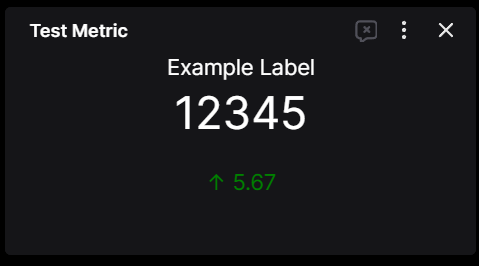
MetricResponseModel takes a label, a value, and an optional delta, and makes a metric widget. Declare list[MetricResponseModel] to return several metrics in one widget.
from openbb_platform_api.models import MetricResponseModel


@app.get("/test_metric", response_model=MetricResponseModel)
async def test_metric():
    """Metric widget."""
    return {"label": "Example Label", "value": 12345, "delta": 5.67}
Generated widget
{
  "test_metric_custom_obb": {
    "name": "Test Metric",
    "description": "Metric widget.",
    "category": "Metric",
    "type": "metric",
    "widgetId": "test_metric_custom_obb",
    "mcp_tool": {
      "mcp_server": "Open Data Platform",
      "tool_id": "test_metric"
    },
    "params": [],
    "endpoint": "/test_metric",
    "runButton": false,
    "gridData": {"w": 4, "h": 5},
    "data": {"dataKey": "", "table": {"showAll": true}},
    "source": ["Custom"],
    "searchCategory": "Metric"
  }
}
PDF
PdfResponseModel takes the document as content bytes, which it encodes as Base64, or as a url, plus an optional filename. One of content or url is required.
from typing import Annotated

from fastapi import Query
from openbb_platform_api.models import PdfResponseModel


@app.get("/open_pdf", response_model=PdfResponseModel)
async def open_pdf(
    file_path: Annotated[
        str, Query(description="Local path to the PDF document.", title="File Path")
    ],
):
    """Open a local PDF document."""
    with open(file_path, "rb") as file:
        pdf = file.read()
    return {"content": pdf}
The generated widget has type pdf, a 20 by 25 grid size, and the category File with subcategory PDF.
Plotly chart
Set the widget type to chart and return the figure's JSON-serializable dictionary. See Plotly charts.
@app.get("/hello_chart", openapi_extra={"widget_config": {"type": "chart"}})
async def hello_chart() -> dict:
    """Plotly chart widget."""
    from plotly.graph_objs import Bar, Figure, Layout

    fig = Figure(
        data=[Bar(x=["A", "B", "C"], y=[1, 2, 3])],
        layout=Layout(title="Hello Chart!"),
    )
    return fig.to_plotly_json()
Omni
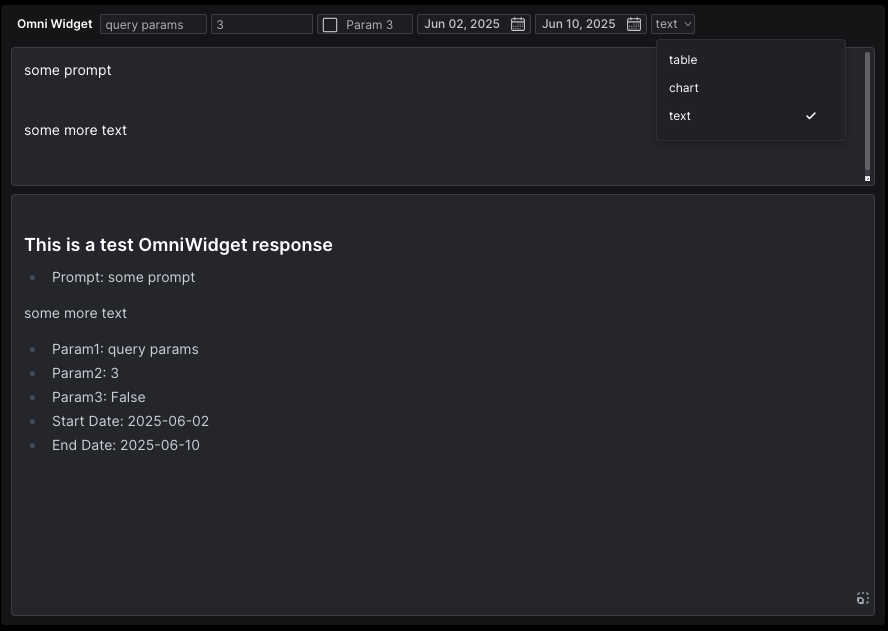
An Omni widget is a POST route with a single body argument that subclasses OmniWidgetInput, which provides the hidden prompt parameter, and OmniWidgetResponseModel as the response model. Return {"content": ...}. The model sets the output type from the content: a list of dictionaries, a dictionary of lists, a pandas DataFrame, or a string holding a JSON list or object is a table; a Plotly figure or its dictionary is a chart; anything else is text. A parse_as value of table, chart, or text in the response skips the detection.
from typing import Literal

from openbb_platform_api.models import OmniWidgetInput, OmniWidgetResponseModel
from pydantic import Field


class OmniQuery(OmniWidgetInput):
    """Query model for an Omni widget."""

    symbol: str = Field(default="AAPL", description="Ticker symbol.")
    parse_as: Literal["table", "chart", "text"] | None = Field(
        default=None, description="Force the output type."
    )


@app.post("/omni_widget", response_model=OmniWidgetResponseModel)
async def omni_widget(item: OmniQuery):
    """Omni widget."""
    if item.parse_as == "text":
        return {"content": f"Prompt: {item.prompt}"}
    return {"content": [{"symbol": item.symbol, "prompt": item.prompt}]}
Form
An input form pairs a POST route that accepts one Pydantic model with a GET route that names it in form_endpoint. The launcher turns the model's fields into the form's inputs, adds a submit button if the model has none, and leaves the POST route out of the widget list. Workspace refreshes the GET widget after a successful submission.
import uuid
from typing import Literal

from fastapi import FastAPI
from pydantic import BaseModel, ConfigDict, Field

app = FastAPI()

AccountType = Literal["General Fund", "Separately Managed", "Family Office"]


class IntakeSubmission(BaseModel):
    """Submit a new intake form."""

    model_config = ConfigDict(model_title_generator=lambda model: "Submit Form")

    first_name: str = Field(title="First Name")
    last_name: str = Field(title="Last Name")
    account_type: AccountType = Field(title="Account Type")


class IntakeRecord(BaseModel):
    """One submitted intake form."""

    first_name: str = Field(title="First Name")
    last_name: str = Field(title="Last Name")
    account_type: AccountType = Field(title="Account Type")
    record_id: uuid.UUID = Field(title="Record ID", default_factory=uuid.uuid4)


RECORDS: list[IntakeRecord] = []


@app.post("/intake_submit")
async def intake_submit(data: IntakeSubmission) -> bool:
    """Store a submitted form."""
    RECORDS.append(IntakeRecord(**data.model_dump()))
    return True


@app.get(
    "/intake",
    openapi_extra={"widget_config": {"form_endpoint": "/intake_submit"}},
)
async def intake() -> list[IntakeRecord]:
    """Submitted intake forms."""
    return RECORDS
Generated widget
{
  "intake_custom_obb": {
    "name": "Intake",
    "description": "Submitted intake forms.",
    "category": "Intake",
    "type": "table",
    "widgetId": "intake_custom_obb",
    "mcp_tool": {
      "mcp_server": "Open Data Platform",
      "tool_id": "intake"
    },
    "params": [
      {
        "type": "form",
        "paramName": "form",
        "label": "Submit Form",
        "description": "Submit a new intake form.",
        "endpoint": "/intake_submit",
        "inputParams": [
          {
            "label": "First Name",
            "description": "First Name",
            "optional": true,
            "type": "text",
            "value": null,
            "paramName": "first_name"
          },
          {
            "label": "Last Name",
            "description": "Last Name",
            "optional": true,
            "type": "text",
            "value": null,
            "paramName": "last_name"
          },
          {
            "label": "Account Type",
            "description": "Account Type",
            "optional": true,
            "type": "text",
            "value": null,
            "options": [
              {"label": "General Fund", "value": "General Fund"},
              {"label": "Separately Managed", "value": "Separately Managed"},
              {"label": "Family Office", "value": "Family Office"}
            ],
            "paramName": "account_type"
          },
          {
            "paramName": "submit",
            "label": "Submit",
            "value": true,
            "type": "button",
            "description": "Submit the form."
          }
        ]
      }
    ],
    "endpoint": "/intake",
    "runButton": false,
    "gridData": {"w": 40, "h": 15},
    "data": {
      "dataKey": "",
      "table": {
        "showAll": true,
        "columnsDefs": [
          {
            "field": "first_name",
            "formatterFn": null,
            "headerName": "First Name",
            "headerTooltip": "First Name",
            "cellDataType": "text"
          },
          {
            "field": "last_name",
            "formatterFn": null,
            "headerName": "Last Name",
            "headerTooltip": "Last Name",
            "cellDataType": "text"
          },
          {
            "field": "account_type",
            "formatterFn": null,
            "headerName": "Account Type",
            "headerTooltip": "Account Type",
            "cellDataType": "text"
          },
          {
            "field": "record_id",
            "formatterFn": null,
            "headerName": "Record ID",
            "headerTooltip": "Record ID",
            "cellDataType": "text"
          }
        ],
        "enableAdvanced": true
      }
    },
    "source": ["Custom"],
    "form_endpoint": "/intake_submit"
  }
}
Server-side row model
A POST route becomes an ssrm_table widget, with no widget_config needed, when its body is AgGridRowsRequest or a subclass of it, or when its response is AgGridRowsResponse[Row]. Both models come from openbb_core.app.model.aggrid. The request carries AG Grid's startRow, endRow, sortModel, filterModel, and grouping; the response returns one page as rowData and the total row count as rowCount. See SSRM mode.
from fastapi import FastAPI
from openbb_core.app.model.aggrid import AgGridRowsRequest, AgGridRowsResponse
from pydantic import BaseModel

app = FastAPI()


class Row(BaseModel):
    """One row."""

    symbol: str
    price: float


ROWS = [Row(symbol=f"SYM{i}", price=float(i)) for i in range(1000)]


@app.post("/rows")
async def rows(request: AgGridRowsRequest) -> AgGridRowsResponse[Row]:
    """Server-side paged rows."""
    page = ROWS[request.startRow : request.endRow]
    return AgGridRowsResponse[Row](rowData=page, rowCount=len(ROWS))
apps.json and agents.json
/apps.json serves app templates from the --apps-json file, by default workspace_apps.json in the data directory set in ~/.openbb_platform/user_settings.json (~/OpenBBUserData unless changed). The launcher creates an empty file if none exists and adds the templates bundled with the package and those returned by routes ending in apps.json. A template is served only if every widget in its layout exists in the current widgets.json, so templates saved from Workspace appear only when the backend can supply them. A directory passed to --apps-json is searched for workspace_apps.json, then apps.json.
/agents.json serves the agents file given with --agents-json, or the agents returned by routes ending in agents.json, or an empty object.
Generate widgets.json without a server
The builder the launcher uses is a function of an OpenAPI dictionary and a list of exclusions, in the format described in Exclude widgets:
import json

from openbb_platform_api.utils.widgets import build_json

from my_app import app

widgets = build_json(app.openapi(), [])
print(json.dumps(widgets, indent=2))
The same call works on an openapi.json document loaded from any server.