Iframe
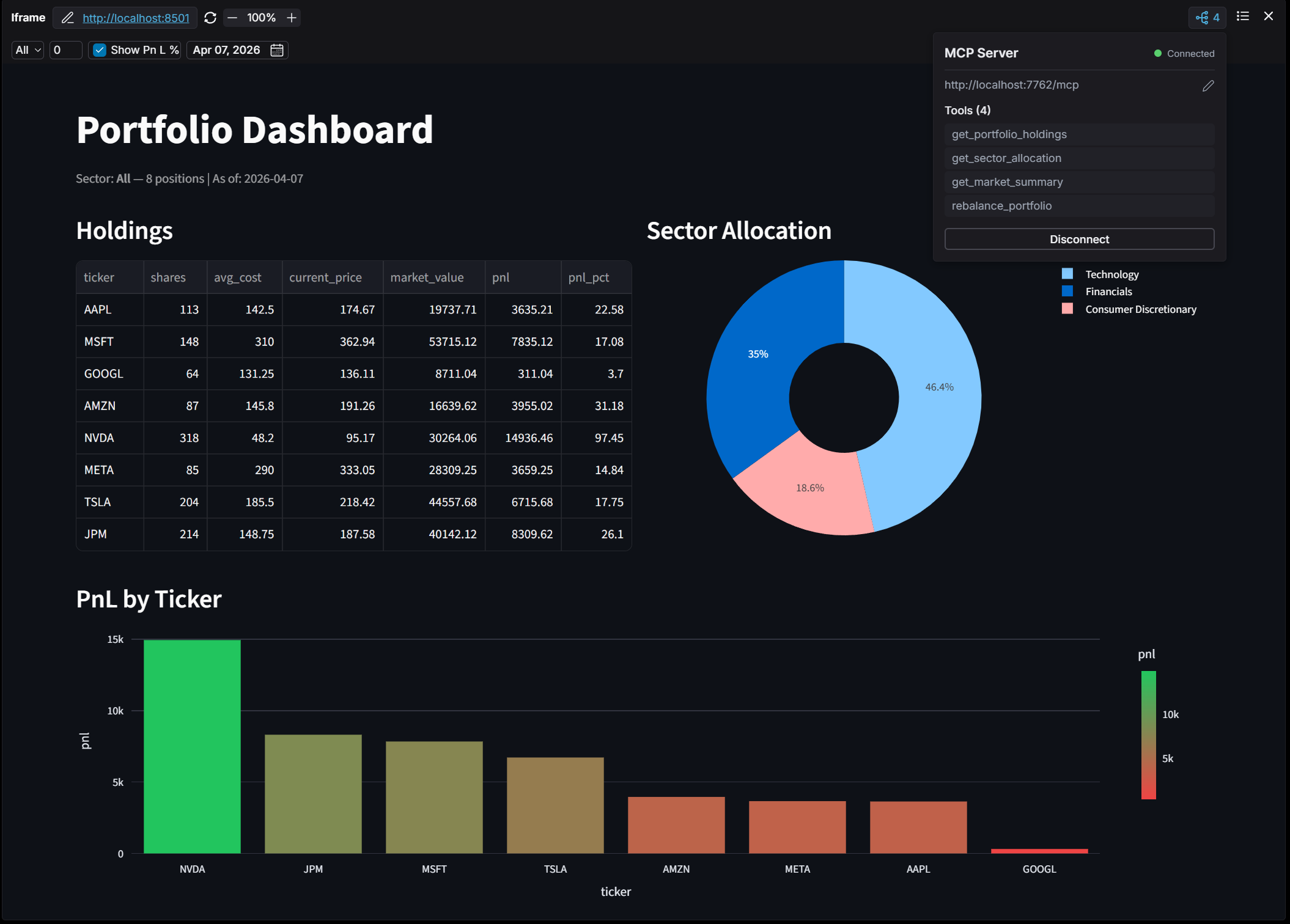
The Iframe widget embeds an external web application — for example a Streamlit dashboard, an internal tool, or any URL that permits embedding — directly inside an OpenBB Workspace dashboard.
On its own, an iframe just renders the URL. But by implementing the Iframe Widget Protocol, the embedded app can do much more:
- Export sub-widgets — declare tables and markdown sections inside the iframe that Workspace can pull out as standalone dashboard widgets.
- Receive toolbar parameters — react to Workspace parameters (dropdowns, dates, toggles) without a backend round-trip.
- Receive auth headers — get the auth headers configured on the widget's backend connection, so the app can make authenticated API calls without re-prompting for credentials.
- Auto-connect an MCP server — wire up Copilot tools the moment the widget mounts.
- Auto-refresh on mutating tool calls — remount the iframe after a destructive MCP tool runs so the UI reflects new state.
A complete working example (Streamlit app + MCP server + widgets.json + apps.json) lives in the backends-for-openbb repository.
Widget definition
An iframe widget is declared in widgets.json with type: "iframe". The endpoint is the initial src of the iframe (the user can still edit it via the widget's URL dialog).
{
  "portfolio_iframe": {
    "name": "Portfolio Dashboard (Streamlit)",
    "description": "Embedded Streamlit portfolio app with MCP tools",
    "category": "Portfolio",
    "type": "iframe",
    "endpoint": "http://localhost:8501",
    "storage": {
      "mcpUrl": "http://localhost:7769/mcp"
    },
    "gridData": { "w": 40, "h": 16 },
    "source": "Streamlit Demo"
  }
}
Two fields are specific to the iframe type:
endpoint— for iframe widgets this is a full URL (the iframesrc), not a backend path. It is the initial address loaded into the iframe.storage.mcpUrl— (optional) an MCP server to auto-connect when the widget mounts. The tools exposed by that server become available to Copilot immediately, with no manual URL entry. If omitted, the user can still attach an MCP server manually via the MCP icon in the widget navbar.
Some websites restrict being embedded in an iframe (via X-Frame-Options or Content-Security-Policy). OpenBB checks for this and only displays pages that permit embedding. Apps you run yourself (such as a local Streamlit app) typically allow it.
The Iframe Widget Protocol
The protocol is a small set of postMessage events exchanged between the embedded app and Workspace. The embedded app announces what it offers, then responds to data requests and parameter updates.
Messages from the iframe → Workspace
-
openbb-connect— sent once on load to announce the available sub-widgets and parameters.target.postMessage({
type: "openbb-connect",
widgets: manifests, // sub-widget manifests
params: paramDefs // toolbar parameter definitions
}, "*"); -
openbb-data— sent in response to anopenbb-request, carrying the data for a sub-widget.target.postMessage({
type: "openbb-data",
widgetId: "portfolio-holdings",
dataType: "table", // "table" or "markdown"
data: [ /* records */ ] // array of rows, or a markdown string
}, "*");
Messages from Workspace → iframe
openbb-request— Workspace asks the iframe for a sub-widget's data. AwidgetIdofnullmeans "send everything."openbb-params-update— Workspace pushes new toolbar parameter values to the iframe (e.g. the user changed a dropdown). The app reads these and re-renders.openbb-auth— Workspace sends the widget's configured auth headers to the iframe in response toopenbb-connect. See Receiving auth headers.
Sub-widget manifests
Each entry in the widgets array of openbb-connect describes one exportable sub-widget:
const WIDGET_MANIFESTS = [
  {
    "widgetId": "portfolio-holdings",
    "name": "Portfolio Holdings",
    "description": "Current portfolio positions with PnL",
    "category": "Portfolio",
    "dataType": "table"        // "table" or "markdown"
  },
  {
    "widgetId": "market-summary",
    "name": "Market Summary",
    "description": "Weekly market analysis and outlook",
    "category": "Research",
    "dataType": "markdown"
  }
];
When the app announces sub-widgets, a grid icon with a count badge appears in the iframe widget's navbar. Clicking it lets the user add any sub-widget to the dashboard as a standalone widget.
Parameter definitions
The params array of openbb-connect declares toolbar parameters Workspace should render for the widget. These mirror the standard widget parameter types:
const PARAM_DEFS = [
  {
    "paramName": "sector",
    "label": "Sector",
    "type": "text",
    "description": "Filter holdings by sector",
    "value": "All",
    "options": [{ "label": "All", "value": "All" }, /* ... */]
  },
  {
    "paramName": "min_shares",
    "label": "Min Shares",
    "type": "number",
    "value": "0",
    "min": 0, "max": 1000, "step": 10
  },
  {
    "paramName": "show_pnl_pct",
    "label": "Show PnL %",
    "type": "boolean",
    "value": "true"
  },
  {
    "paramName": "as_of_date",
    "label": "As Of Date",
    "type": "date",
    "value": "2026-04-07"
  }
];
When a user changes a parameter, Workspace sends an openbb-params-update message. A common pattern (used by the Streamlit example) is to mirror the values into the iframe's query string so the embedded app can read them on rerun.
Minimal bridge
The bridge below is the complete client side of the protocol — announce on load, then answer requests. Inject it into your app's page (in Streamlit, via st.components.v1.html(...)).
(function () {
  const manifests = WIDGET_MANIFESTS;
  const paramDefs = PARAM_DEFS;
  const widgetData = WIDGET_DATA;   // { widgetId: { type: "openbb-data", widgetId, dataType, data } }

  const target = window.top || window.parent;

  // Announce available sub-widgets + params
  if (target !== window) {
    target.postMessage({ type: "openbb-connect", widgets: manifests, params: paramDefs }, "*");
  }

  window.addEventListener("message", function (event) {
    if (!event.data || !event.data.type) return;

    if (event.data.type === "openbb-request") {
      const widgetId = event.data.widgetId;
      if (widgetId === null) {
        Object.values(widgetData).forEach((d) => target.postMessage(d, "*"));
      } else if (widgetData[widgetId]) {
        target.postMessage(widgetData[widgetId], "*");
      }
    }
  });
})();
Receiving auth headers (openbb-auth)
If the widget's backend connection was configured with auth headers (for example an Authorization or X-API-KEY header entered when the backend was added to Workspace), Workspace forwards those headers to the embedded app so it can make authenticated requests of its own — for instance, calling the same backend the widget belongs to.
The flow is part of the handshake:
-
The embedded app sends
openbb-connect(as in the Minimal bridge above). -
Workspace replies with an
openbb-authmessage containing the configured headers:{
type: "openbb-auth",
headers: { "Authorization": "Bearer ...", "X-API-KEY": "..." }
} -
The app stores the headers and attaches them to its API calls:
let authHeaders = {};

window.addEventListener("message", function (event) {
  if (event.data?.type === "openbb-auth") {
    authHeaders = event.data.headers;
    // e.g. re-fetch data now that credentials are available
  }
});

// Later, in your data fetching:
fetch("https://my-backend.example.com/portfolio", { headers: authHeaders });
Because openbb-auth is only sent in reply to openbb-connect, register your message listener before (or at the same time as) sending the handshake, or the reply may arrive before you are listening.
Security constraints
Workspace only sends openbb-auth when both of these hold:
- The backend connection actually has headers configured — if there are none, no message is sent.
- The
openbb-connectmessage's origin exactly matches the origin of the iframe'ssrcURL. The reply is posted targeted at that origin (never"*"), so credentials cannot leak to a different origin.
The origin check means pages that send the handshake from a nested sub-frame on a different origin than the widget's endpoint URL (some component-based frameworks do this) will not receive the headers — send openbb-connect from the top-level page of your app in that case.
Pushing parameters back to Workspace
The protocol messages above cover the inbound direction — Workspace pushing parameter values into the iframe with openbb-params-update. The parameter bridge is the outbound direction: a widget pushes a new parameter value back to Workspace. Workspace persists the update and re-sends it to every widget grouped on that parameter, so one widget can drive the rest of the dashboard.
This lets you build interactive controls — a ticker selector, a date picker, a set of buttons — inside a widget and have the rest of the dashboard react to them.
The update message
Send an openbb:widget-params:update message. Either update all params at once:
{ type: "openbb:widget-params:update", params: { ticker: "NVDA" } }
…or a single named param:
{ type: "openbb:widget-params:update", paramName: "ticker", value: "NVDA" }
For the update to propagate, the receiving widgets must share the same paramName and be in the same group. In apps.json, group the widgets with a param group on that parameter:
"groups": [
  {
    "name": "Group 1",
    "type": "param",
    "paramName": "ticker",
    "widgetIds": ["mock_quote", "bridge_iframe"],
    "defaultValue": "AAPL"
  }
]
Sending the message: iframe vs. HtmlViewer
How you send the message depends on the widget type, because the two forward it differently:
iframe— the embedded page posts the message directly to the parent withwindow.parent.postMessage(...).html(HtmlViewer) — the page dispatches aCustomEvent; the bridge script Workspace injects into the HtmlViewer forwards it for you. The page must notpostMessageitself.
Iframe widget — post the update straight to the parent window:
function pick(ticker) {
  const msg = { type: "openbb:widget-params:update", params: { ticker } };
  (window.top || window.parent).postMessage(msg, "*");
}
HtmlViewer widget — dispatch a CustomEvent and let the injected bridge forward it (with the security token). Do not call postMessage directly:
function pick(ticker) {
  window.dispatchEvent(new CustomEvent("openbb:widget-params:update", {
    detail: { type: "openbb:widget-params:update", params: { ticker } }
  }));
}
After Workspace persists the update, it re-sends the new value to every widget in the group, which then re-fetch with the new parameter — the full round-trip from one widget's button click to the whole group updating.
The HtmlViewer (type: "html") outbound bridge relies on the page's JavaScript running so it can dispatch the CustomEvent. JavaScript in an HTML widget executes, so the page's event handlers run as written.
A complete working backend showing both paths (mock data, no API keys) is in the iframe parameter bridge example.
Auto-connecting an MCP server
Set storage.mcpUrl in the widget definition to attach an MCP server automatically when the iframe mounts. Its tools become available to Copilot with no manual setup:
"portfolio_iframe": {
  "type": "iframe",
  "endpoint": "http://localhost:8501",
  "storage": {
    "mcpUrl": "http://localhost:7769/mcp"
  }
}
This is most useful when shipping a pre-built app via apps.json: the dashboard loads with the iframe URL pre-set and the MCP server already connected, giving a true one-click experience.
Auto-refresh on mutating MCP tools
When an MCP tool is connected to an iframe widget, Workspace can automatically remount the iframe after a tool call so the UI reflects the new state. The default is no refresh — only tools that explicitly opt in trigger a remount. This avoids unwanted reloads during read-only operations.
Opt in by marking the tool with destructiveHint=True in its annotations:
from mcp.server.fastmcp import FastMCP
from mcp.types import ToolAnnotations

mcp = FastMCP("Portfolio Dashboard", host="0.0.0.0", port=7769)

# Read-only tool — no annotation needed (no refresh)
@mcp.tool()
def get_portfolio_holdings(sector: str = "All") -> str:
    ...

# Mutating tool — opts in to iframe refresh
@mcp.tool(annotations=ToolAnnotations(destructiveHint=True))
def rebalance_portfolio() -> str:
    ...
After Copilot calls rebalance_portfolio, the iframe remounts and the embedded app reloads with the new state.
Serving everything from one backend
A convenient pattern is to serve the MCP transport and the Workspace backend routes from a single process, so adding one URL in Workspace wires up tools, widget definitions, and app layout together. The Streamlit example mounts the Workspace routes alongside a FastMCP streamable_http_app:
| Route | Purpose |
|---|---|
/mcp | MCP tools (FastMCP) |
/widgets.json | Widget definitions for OpenBB Workspace |
/apps.json | Pre-built app layout |
/portfolio_note | Markdown content for a companion note widget |
Additional Resources
- Full working example: Streamlit Iframe Widget Protocol demo
- widgets.json Reference
- apps.json Reference
- MCP Tools